
If you’ve ever wanted to conduct a thorough hardware check on your Samsung Galaxy phone, there’s a powerful, built-in tool just a few taps away. By dialing the simple but potent code `*#0*#`, you can access Samsung’s hidden diagnostic menu.
This secret panel, often called “General Test Mode” or “HwModuleTest,” is designed for technicians but is incredibly useful for users who want to verify their phone’s components are working perfectly.
## 🛠️ What is the `*#0*#` Secret Menu?
The `*#0*#` code opens a service menu filled with individual buttons that activate specific hardware tests. It’s a direct line to your phone’s internal diagnostic system, allowing you to test components like the screen, sensors, cameras, and speakers independently.
Think of it as a pro-level check-up tool that was pre-installed at the factory. Importantly, these tests are **read-only** diagnostics; they check functionality without making permanent changes to your phone’s settings or data.
### How to Access the Menu
Accessing this hidden feature is straightforward:
Open the standard **Phone** app on your Samsung device to get to the dial pad.

Carefully type the code: `*#0*#` (star, hash, zero, star, hash).
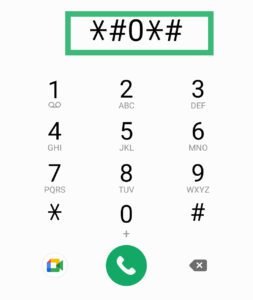
The diagnostic menu should appear instantly as a white grid of buttons—you do not need to press the call button.
**⚠️ Important Note:** A common reason this code may not work is if Samsung’s **Auto Blocker** security feature is enabled. If the menu doesn’t appear, try going to **Settings > Security and privacy > Auto Blocker** and temporarily disable it. Remember to turn it back on after you’re done testing.
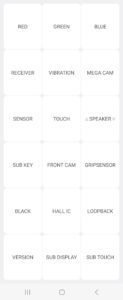
## 📋 A Tour of the Diagnostic Tests
Once inside, you’ll see a grid of buttons, each labeled with the component it tests. The exact options can vary slightly by model, but here are the most common and useful tests you can run:
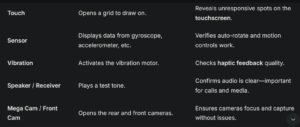
**A Hidden Surprise:** Within the **Sensor** test screen, many Samsung phones hide a quirky secret. Tap the **”Image Test”** or **”IMAGE TEST”** button, and you might be greeted by a low-resolution photo of a Chihuahua looking at the camera. Samsung has never officially explained this “Easter egg,” but it has become a famous and fun discovery for users.

## ⚠️ Safety Tips and Official Alternatives
The `*#0*#` menu is safe for diagnostics, but you should exercise caution with other “secret codes” you find online. **Never input a code unless you are 100% sure of its purpose**. Some codes, like `*2767*3855#`, can trigger an immediate factory reset without any warning, permanently erasing all your data.
### How to Exit the Menu
To leave the diagnostic screen, you can usually press the **Back button** twice or press and hold the **Power button** to access the power menu and select “Restart”.
By using `*#0*#` responsibly, you can become your own phone technician, quickly identifying issues and ensuring every part of your Samsung Galaxy is in top shape.
I hope this guide helps you explore your phone’s capabilities. If you’re curious about other useful codes, like checking your phone’s manufacturing date or IMEI, feel free to ask